JS
API 备忘
parseInt
parseInt 解析一个字符串参数,并返回指定基数的十进制整数或 NaN。
parseInt(string[, radix])
string: 要被解析的值。若参数不为字符串,则默认会将其转为字符串。字符串开头的空白符将会被忽略。radix: 基数。介于2-36之间的整数。
TIP
注意: 在 radix 为 0 或 undefined,或没有指定的情况下,JS 作如下处理:
- 如果字符串
string以0x或者0X开头,则基数是16。 - 如果字符串
string以0开头,基数是8或者10,一般为10,具体视环境而定。 - 如果字符串
string以其它任何值开头,则基数是10。
TIP
返回 NaN 的情况
radix不在 2-36 范围之内string左起第一个数大于进制数radix- 第一个非空字符不为数字
map
map 创建一个新数组,其值由原数组中每个元素执行回调函数的结果组成。
arr.map(function callback(currentValue[,index[, array]]) {
  // Return element for new_array
}[, thisArg])
callback:生成新数组元素的回调函数。currentValue:数组中正在处理的当前元素。index:数组中正在处理的当前元素的索引。array: 被调用的数组。
thisArg: 执行callback函数时使用的this值。
浏览器存储
localStorage & sessionStorage
localStorage.setItem()
sessionStorage.setItem()

localStorage.getItem()
sessionStorage.getItem()

localStorage.removeItem()
sessionStorage.removeItem()

localStorage.clear()
sessionStorage.clear()
TIP
localStorage/sessionStorage 只能存储字符串,无法存储对象数组。 实在要存需要先转为 JSON,以 localStorage 为例,如下:
let arr = [1, 2, 3]

localStorage.setItem('arr', JSON.stringify(arr))
JSON.parse(localStorage.getItem('arr'))
cookie
const getCookie = (name) => {
  let matches = document.cookie.match(new RegExp(
    "(?:^|; )" + name.replace(/([.$?*|{}()[\]\\/+^])/g, '\\$1') + "=([^;]*)"
  ));
  return matches ? decodeURIComponent(matches[1]) : undefined;
}
const setCookie = (name, value, options = {}) => {
  options = {
    path: '/',
    // add other defaults here if necessary
    ...options
  };

  if (options.expires instanceof Date) {
    options.expires = options.expires.toUTCString();
  }

  let updatedCookie = encodeURIComponent(name) + "=" + encodeURIComponent(value);

  for (let optionKey in options) {
    updatedCookie += "; " + optionKey;
    let optionValue = options[optionKey];
    if (optionValue !== true) {
      updatedCookie += "=" + optionValue;
    }
  }

  document.cookie = updatedCookie;
}

// 使用示例
setCookie('user', 'John', {secure: true, 'max-age': 3600});
const deleteCookie = (name) => {
  setCookie(name, "", {
    'max-age': -1
  })
}
DOM 操作
获取节点
document.getElementById()
document.getElementsByTagName()
document.getElementsByClassName()
document.querySelector()
document.querySelectorAll()

xxx.children
xxx.firstElementChild
xxx.lastElementChild

xxx.childNodes // 包含文本、换行、空格
xxx.firstChild // 包含文本、换行、空格
xxx.lastChild // 包含文本、换行、空格
创建节点
document.createElement()
添加节点
xxx.appendChild()
删除节点
// 删除节点
xxx.remove()

// 删除节点下的某个子节点
xxx.removeChild()

// 删除节点下所有子节点
xxx.innerHTML = ''
动态添加删除类名
xxx.classList.add()
xxx.classList.remove()
xxx.classList.toggle()
xxx.classList.contains()
动态获取盒子宽高
// 只能获取行内样式设置的宽高,内部和外部样式表的样式取不到。
// 且该宽高只是设置的宽高,不等于最终渲染后的宽高
// 比如 box-sizing 为 content-box 时,盒子宽高还受 padding、border 影响
xxx.style.width
xxx.style.height

// 获取最终渲染后的宽高(仅 IE 兼容)
xxx.currentStyle.width
xxx.currentStyle.height

// 获取最终渲染后的宽高(多浏览器兼容,IE9 以上支持)
xxx.getComputedStyle(xxx).width
xxx.getComputedStyle(xxx).height

// 获取最终渲染后的宽高(多浏览器兼容,IE9 以上支持。此外还可取到相对于视窗上下左右的距离。)
xxx.getBoundingClientRect().width
xxx.getBoundingClientRect().height

// 获取最终渲染后的宽高(最常用,兼容性最好,包括宽高、内边距和边框)
xxx.offsetWidth
xxx.offsetHeight
设置样式
xxx.style.xxx
xxx.setAttribute('style', xxx)

xxx.className
xxx.classList

xxx.style.getPropertyValue(xxx)
xxx.style.setProperty(xxx, xxx, xxx)
xxx.style.removeProperty(xxx)
根元素 html
// JS
document.documentElement

// CSS
:root {}
new Image() & document.createElement('img')
两者都能创建图片节点,可视为等价。
DOM 事件
触摸事件
touchstart 手指触摸屏幕
touchmove 手指滑动屏幕
touchend 手指离开屏幕
鼠标事件
click 点击
dblclick 双击

mousemove 鼠标移动
mousedown 鼠标按键按下
mouseup 鼠标按键抬起

mouseenter 鼠标悬停在元素上
mouseleave 鼠标离开元素

mouseover 鼠标悬停在元素上(冒泡)
mouseout 鼠标离开元素(冒泡)
键盘事件
keydown 键盘按键按下
keyup 键盘按键抬起
keypress 键盘按键按下(仅限于字符按键)
过渡事件
transitionstart 过渡开始
transitionend 过渡结束
transitionrun 过渡中
transitioncancel 过渡取消
动画事件
animationstart 动画开始
animationend 动画结束
animationiteration 动画重复播放
animationcancel 动画取消
表单事件
blur 失焦
focus 聚焦
input 输入
change 输入后失焦
其他事件
contextmenu 右键事件
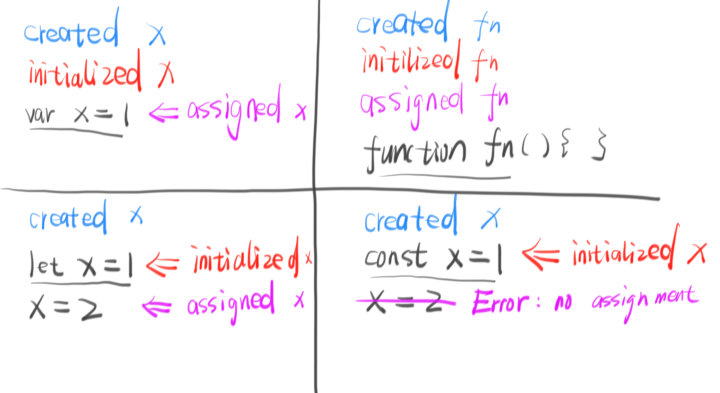
var、let 及 const
call、apply 和 bind
call、apply调用函数,bind不会调用函数call、bind传参使用逗号隔开,apply传参直接传数组
onclick & addEventListener
- onclick 不能同时执行两个函数,而 addEventListener 可以
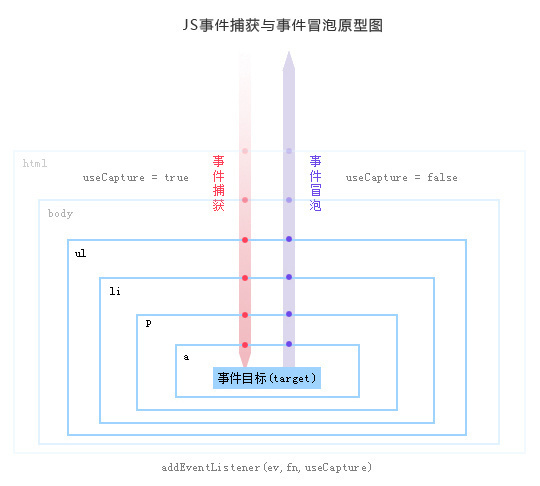
- onclick 只能冒泡阶段触发,而 addEventListener 捕获和冒泡阶段皆可
- onclick 移除事件侦听直接覆盖即可,而 addEventListener 需要使用 removeEventListener 移除
- onclick 支持 IE 低版本,addEventListener 不支持 IE8 以下,低版本 IE 使用 attachEvent 进行事件侦听
event.target & event.currentTarget
- event.target:事件触发者
- event.currentTarget:事件监听者
<div id="outer">
  <div id="inner">123</div>
</div>

<script>
  document.getElementById('outer').onclick = function(e){
    console.info('e.target', e.target) // <div id="inner">...</div>
    console.info('e.currentTarget', e.currentTarget) // <div id="outer">...</div>
  }
</script>
event.target 和 event.currentTarget
event.preventDefault & event.stopPropagation
- event.preventDefault:阻止浏览器默认行为
- event.stopPropagation:阻止事件冒泡或捕获
- event.stopImmediatePropagation: 除可阻止事件冒泡或捕获外,还可阻止事件的其他监听器
- return false:既阻止浏览器默认行为,又阻止事件冒泡或捕获
setAttribute & setProperty
- setAttribute: 设置 html 元素属性值
- setProperty: 设置 css style 样式
xxx.setAttribute()
xxx.style.setProperty()
事件捕获 & 事件冒泡
事件绑定
// 方式一
<button onclick="handleClick"></button>

// 方式二
let btn = document.querySelector('button')
btn.onclick = handleClick
btn.onclick = null

// 方式三
let btn = document.querySelector('button')
btn.addEventListener('click', handleClick)
btn.removeEventListener('click', handleClick)
typeof & instanceof
- typeof
null、array会被判别为object,其他判断无误 - instanceof
只能用于判断引用数据类型,不可用于基本数据类型
Object.is 和 ===
主要在于对 NaN 和 ±0 的处理不同。
NaN === NaN  // false
+0 === -0  // true

Object.is(NaN, NaN)  // true
Object.is(+0, -0)  // false
Number.isNaN & isNaN
Number.isNaN只在参数值为NaN时,返回trueisNaN会尝试将参数转换为数值,任何不能被转换为数值的的值都会返回true
Number.isNaN('aa') // false
isNaN('aa') // true
async/await 与 Promise
因为 async/await 本身就是 promise + generator 的语法糖。所以 await 后面的代码是 microtask 。
async function async1() {
 console.log('async1 start')
 await async2()
 console.log('async1 end')
}
可视为
async function async1() {
 console.log('async1 start')
 Promise.resolve(async2()).then(() => {
  console.log('async1 end')
 })
}
可近似视为
async function async1() {
  new Promise((resolve, reject) => {
    console.log('async1 start')
    resolve(async2())
  }).then(() => {
    console.log('async1 end')
  })
}
WARNING
Promise.resolve(v) 与 new Promise(r => r(v)) 不完全等价。
待后续研究。
判断数组方式
- Array.isArray(arr)
- arr instanceof Array
- arr.constructor === Array
- Object.prototype.toString.call(arr) === '[object Array]'
- 等等
数组 & 链表
- 数组静态分配内存,链表动态分配内存
- 数组在内存中连续,链表不连续
- 数组元素在栈区,链表元素在堆区
Object & Map
- 对象的 key 只能是字符串,Map 则可以是任意类型
- 对象获取 value 是通过点号或中括号,Map 则是通过 get 方法
- 对象检查 key 是否存在是通过 hasOwnProperty 方法,Map 则是通过 has 方法
- 对象删除某个属性是通过 delete 操作符,Map 则是通过 delete 方法
click/dblclick 单双击点击事件冲突
click 事件延迟执行,dblclick 时取消 click 延时。
let timer

document.querySelector('div').addEventListener('click', () => {
  clearTimeout(timer)
  timer = setTimeout(() => console.log('单击'), 400)
})

document.querySelector('div').addEventListener('dblclick', () => {
  clearTimeout(timer)
  console.log('双击')
})
URL 解析
| 属性 | 值 |
|---|---|
| window.location.href | https://violet.com:8080/rem/index.html?a=1&b=2#shadow |
| window.location.protocol | https: |
| window.location.hostname | violet.com |
| window.location.port | 8080 |
| window.location.pathname | /rem/index.html |
| window.location.search | ?a=1&b=2 |
| window.location.hash | #shadow |
| window.location.host | violet.com:8080 |
| window.location.origin | https://violet.com:8080 |
JS 如何获取 URL ? 后的参数信息
如何使用 JS 解析 URL
图片引入
图片引入分外链引入和本地引入,外链引入没什么好说的,常规引入就行。但本地引入就有说法了。 当引入本地资源图片时,打包前能正常显示,但打包后图片资源路径会发生变化,这时候就显示不出来了。
解决该问题有两种方法,如下:
// import 引入
import violet_url from '../images/violet.png'

// require 引入
const violet_url = require('../images/violet.png')
TIP
require 内容不能是一个纯变量。
// 错误案例
const url = '../images/violet.png'
const violet_url = require(url)
require 拼接,可包含部分变量。(RN 中貌似不支持动态拼接,只能是完整字符串。)
const image_name = 'violet'
const image_complete_name = 'violet.png'

// 纯字符串
const violet_url = require('../images/violet.png')

// 目录 + 文件全名
const violet_url = require('../images/' + image_complete_name)

// 目录 + 文件名 + 后缀
const violet_url = require('../images/' + image_name + '.png')
在 React 中使用 require 和 import 语句来导入图片
生成限定范围内随机数
Math.floor(Math.random() * (max – min + 1)) + min
图片转 base64
Canvas
// 1. 构造一个 img 元素,将 url 赋给 img
// 2. 等待图片加载完成
// 3. 构造一个 canvas 元素
// 4. 将 img 元素画到 canvas 上
// 5. 通过 canvas 得到 base64

// 可参考:https://juejin.cn/post/6844903997841604621

const convertImgToBase64 = (url) => {
  const img = new Image()

  img.crossOrigin = 'Anonymous'

  img.addEventListener('load', () => {
    const canvas = document.createElement('canvas')
    canvas.width = img.width
    canvas.height = img.height

    const ctx = canvas.getContext('2d')
    ctx.drawImage(img, 0, 0)

    const base64 = canvas.toDataURL('image/png')
    console.log(base64)
  })

  img.src = url
}
FileReader
// 1. 创建一个 FileReader 对象
// 2. 等待图片文件读取完毕
// 3. 通过 FileReader 得到 base64

const convertImgToBase64 = (file) => {
  const reader = new FileReader()

  reader.addEventListener('load', () => {
    const base64 = reader.result
    console.log(base64)
  })

  reader.readAsDataURL(file)
}